
We have seen that the business segment of the laptop industry has undergone a major transition, driven by AI integration into hardware, stricter enterprise security requirements, and the demand for highly efficient portable systems. Traditional performance metrics like CPU speed and high-resolution displays are no longer the sole focus for manufacturers these days. Instead, they are emphasizing on-device AI acceleration, battery efficiency, and hybrid work capabilities. Big names in the industry like Dell, HP, and Lenovo are competing to redefine modern business laptops by integrating NPUs, improving thermals, and maintaining reliability. With the biggest shift toward AI-assisted workflows, laptops are now evolving into intelligent productivity tools instead of just traditional computing devices.
For today’s review, we have brought the Lenovo ThinkPad T14 Gen 6 (AMD). A new addition in this lineup that blends classic ThinkPad reliability with next-generation AI-focused hardware. The laptop is powered by an AMD Ryzen AI 7 PRO 350 CPU with 8 cores and 16 threads, and an integrated NPU capable of handling AI workloads locally. The combination of 32GB DDR5 RAM and PCIe 4.0 storage helps create a smooth multitasking ecosystem.
Specifications
| Screen | 14″, 2880×1800, OLED, 500nits, 100% DCI-P3, 120Hz, 16:10, 100,000:1, Anti-glare, anti-reflection, anti-smudge, DisplayHDR True Black 500, Dolby Vision, Eyesafe |
| Processor | AMD Ryzen AI 7 PRO 350 (2.00 GHz, up to 5.00 GHz Max Boost, 8 Cores, 16 Threads, 16 MB Cache) |
| Wireless Connection | MediaTek Wi-Fi 7 MT7925, 802.11be 2×2 Wi-Fi, Bluetooth® 5.4 |
| Graphics card | AMD Radeon 860M |
| Memory | 32GB DDR5 5600MHz, 2 DIMM Slots |
| Storage | 512GB M.2 PCIe Gen 4 SSD, 2280, SK Hynix PC801 |
| Ports | 1x USB-A (USB 5Gbps / USB 3.2 Gen 1) 1x USB-A (USB 5Gbps / USB 3.2 Gen 1), Always On 2x USB-C (Thunderbolt 4 / USB4 40Gbps), with USB PD 3.0 and DisplayPort 2.1 1x HDMI 2.1, up to 4K/60Hz 1x Headphone/microphone combo jack (3.5mm) 1x Ethernet (RJ-45) |
| Battery | 57Wh, 65W AC adapter |
| OS | Windows 11 Pro |
| Weight | 1.35 kg (7.94 lbs) |
Body Design
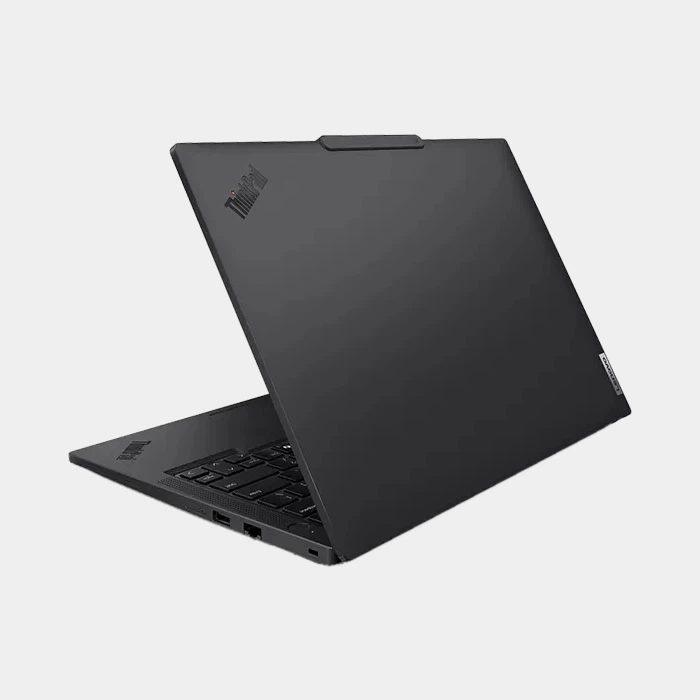
Starting with the laptop’s appearance, the ThinkPad T14 Gen 6 AMD closely follows the design language that has defined ThinkPad for decades. The key highlights of the laptop’s body are:
- Matte black finish
- Minimal branding
- Functional over aesthetic design
At first glance, the laptop may look unchanged, but the subtle refinements become noticeable after some use. The chassis is made from a fiber/carbon composite, which strikes a balance between durability and weight. With a weight of 1.35kg, it comfortably fits into the portable category without compromising rigidity.
The laptop’s build quality has all the key characteristics that you expect from a ThinkPad laptop:
- Minimal flex in the keyboard deck
- Strong hinge resistance
- Solid lid with internal roll-cage reinforcement
In addition, its 180-degree hinge allows you to lay the laptop completely flat. While not essential for everyone, this feature is extremely useful in collaborative work environments. Interestingly, the hinge adjustment is excellent; you can open the lid with one hand, yet it remains stable enough to hold the device by the corner without any wobble. That level of engineering precision is something many competitors still struggle with.
Practical design elements
Some other key elements that Lenovo continues to prioritize for usability:
- Raised webcam lip for easy opening
- Anti-loss screws on the bottom panel
- Logical port placement
- Easy serviceability
The final verdict on the design is that this laptop isn’t designed to impress visually but to work reliably every day.
Display
Traditionally, ThinkPads were known more for their hardware than their displays, but with this model, the manufacturer has changed that perception. The variant we are testing comes with a 14-inch OLED display and has the following specs:
- Resolution: 2880 x 1800
- 120Hz refresh rate
- 100% DCI-P3 color gamut
- 500 nits brightness
For the first time, we have seen a ThinkPad laptop offer a display with vibrant, accurate colors. The contrast level is great (true blacks from OLED), and the motion feels smooth thanks to the 120Hz refresh rate. For a business laptop, this is arguably overkill, but in a good way.
At 500 nits, visibility outdoors is quite good, though reflections from the glossy OLED surface can be noticeable in direct sunlight.
Discovered Drawbacks:
- Thicker bezels compared to other business laptops.
- Potential OLED burn-in concerns (in long-term usage)
However, the overall display elevates the device significantly.
Webcam
On top of the display, the laptop integrates a 5MP webcam with IR support, making it useful for clearer video calls and Windows Hello facial recognition. Lenovo also adds a physical webcam shutter, which is a practical privacy feature for professional environments.
Keyboard
The Lenovo ThinkPad T14 Gen 6 still offers the same six-row keyboard design as its predecessor models and continues to build on ThinkPad’s long-standing reputation for providing one of the best typing experiences in the business segment with the following characteristics:
- Deep Key Travel (rare in modern business laptops)
- Tactile, responsive feedback
- Large keycaps for more accurate typing
After typing for a long time, the fatigue was minimal, making it an ideal choice for developers, writers, analysts, or anyone who types for hours every day. The keyboard layout is basically standard, but the positions of the Fn and Ctrl keys are swapped, and the arrow keys are slightly smaller, which are all iconic features of almost all ThinkPad laptops.
TrackPoint and TouchPad:
The iconic TrackPoint from the ThinkPad series is still here, and for many users, it is something non-negotiable. Its key features are as follows:
- Precise cursor control without lifting hands
- Dedicated physical buttons
- Ideal for tight working spaces
On the other hand, the TouchPad covers a big space in the palmrest (same as in predecessor models) and has the following characteristics:
- Large and smooth
- Accurate tracking
- Reliable Gesture Support
This dual-input system gives users flexibility that most business laptops lack.
Biometrics:
- Fingerprint reader integrated into the power button
- IR camera for facial recognition
Using both together adds reliability and business-focused security experience to the laptop.
Ports and Connectivity
The laptop comes with a wide range of ports, making it a practical model designed for business users. Lenovo has included enough flexibility for office, travel, and desk use without making significant changes to the body. The laptop has the following ports:
Left Side:
- 2x USB Thunderbolt 4 ports
- 1x HDMI 2.1 Port
- 1x USB-A (USB 5Gbps), Always On
- 1x 3.5mm audio jack
Right Side:
- 1x USB-A (USB 5Gbps)
- 1x Ethernet RJ45
- 1x Kensington Lock
Wireless:
- Wi-Fi 7 (MediaTek MT7925, 802.11be 2×2 Wi-Fi)
- Bluetooth 5.4
It is one of the most complete ports and connectivity setups we have seen in this segment, offering users enough flexibility for office desks, travel, and external displays. In addition, the inclusion of modern wireless connectivity also makes it ready for newer networks and accessories. Overall, it feels reliable, versatile, and well-suited for everyday office work.
Battery and Charging
The ThinkPad T14 Gen 6 comes with a 57 WHr lithium-ion battery, a practical capacity for a laptop with a slim profile. Thanks to the Ryzen AI platform, it plays a major role in maintaining good battery life without heavily limiting performance. For everyday office use, including browsing, email, and document editing, we can expect long working sessions without the charger.
Benchmark results
Through PCMark 10 Modern Office, we got the following results:
- Benchmark used: PCMark 10 Modern Office
- Power Mode: Balanced
- Test Started: 97% Battery
- Test Ended: 2% Battery
- Recorded Battery Life: 9 hours and 20 minutes
Based on benchmarks, we can conclude that the laptop can last through most of a normal workday under moderate workloads. However, heavier tasks such as sustained multitasking, video conferencing, or local AI workloads will naturally reduce battery life.
Charging
The company has provided a 65W adapter with the laptop and claims that it can charge 80% of the battery in 1 hour. In our testing, the laptop took roughly 1.5 hours to charge fully, with faster top-ups in the first 50–60%.
RAM and SSD
The Lenovo ThinkPad T14 Gen 6 offers a well-balanced RAM and storage combination that aligns well with its professional, productivity-focused positioning. Key highlights from this section are as follows:
- 32GB DDR5-5600 Dual-Channel RAM
- 512GB SK Hynix PC801 PCIe 4.0 NVMe SSD
The 32GB DDR5 dual-channel memory is more than sufficient for heavy multi-tasking, enterprise workloads, and even light AI-based applications. The high memory bandwidth ensures smooth performance across various office scenarios. In addition, the dual-channel setup helps maximize overall system responsiveness.
RAM Benchmarks
Using AIDA64 cache and memory benchmark, the following are the benchmark results:
- Read speed: 62,391 MB/s
- Write speed: 85,812 MB/s
- Copy speed: 73,411 MB/s
- Latency: 111.4 ns
Overall, the results show strong memory bandwidth, making the laptop well-suited for multitasking, office tasks, and heavier productivity work.
On the storage side, the laptop comes with a 512GB PCIe 4.0 NVMe SSD manufactured by SK Hynix with model number PC801. It helps deliver fast boot times, quick application launches, and strong data transfer speeds, making daily usage feel snappy and efficient.
SSD Benchmarks
The following are the storage benchmarks of ThinkPad T14 Gen 6:
- SSD Model: SK Hynix PC801 (PCIe 4.0 x4)
- Sequential Read Speed: 7131.57 MB/s
- Sequential Write Speed: 5025.48 MB/s
- 4K Random Read: 131 MB/s
- 4K Random Write: 48 MB/s
Benchmarks indicate fast real-world performance, with strong sequential speeds for large file transfers and decent random performance for everyday responsiveness.
Upgrade Option
After removing the bottom cover, it was found that there are two M.2 slots that allow you to install another SSD. Overall, the internal layout is clean and accessible, with components thoughtfully arranged to ensure stability and ease of maintenance. The RAM sticks are covered with a shield, reducing direct hand contact and improving reliability, while the SSD is equipped with a heatsink to maintain a consistent user experience. The combination of these strong specs makes the laptop a future-proof option for users who plan to keep their device for several years.
CPU
The ThinkPad T14 Gen 6 is powered by the latest AMD Ryzen AI 7 PRO 350 CPU, a modern processor focused on efficiency, business productivity, and AI-assisted workloads. Thanks to its lower power consumption, the balance between workload and battery life is quite efficient. The following are the CPU specifications:
- Core/Threads: 8 Cores/16 Threads
- Maximum Boost Frequency: Up to 5.0 GHz
- Default Power: 28W
- Integrated GPU: Radeon 680M
- NPU Performance: Up to 50 TOPS
We also did benchmark testing throughout, during which the processor delivered strong single-core and multi-core results. The system’s thermal performance was also good, and fan noise was quite minimal.
CPU Benchmark Results:
- Cinebench R23: 1,918 pts on Single-Core and 13,862 pts on Multi-Core
- Cinebench 2024: 112 pts on Single-Core and 740 pts on Multi-Core
- POV-Ray: 713.98 PPS on Single-Core and 4668.26 PPS on Multi-Core
- 3DMark CPU: 1,113 on Single Thread and 6,753 on Max Threads
The AMD Ryzen AI 7 PRO 350 CPU features an integrated AMD Radeon 860M GPU based on the latest RDNA 3.5 architecture. This integrated GPU can handle all basic graphics-intensive processes, such as media playback, basic photo editing, and UI-heavy applications. Thanks to fast DDR5 RAM, the GPU’s overall graphics responsiveness is quite good.
Cooling System
The laptop uses a fairly simple cooling setup based on a single fan and a widened heat pipe. On paper, this may not sound very impressive, especially compared to laptops with dual-fan cooling systems. However, for a business laptop powered by a 28W Ryzen AI CPU, this setup actually feels okay. The internal design focuses more on being quiet and stable rather than pushing maximum performance at the cost of noise.
Stress Testing
For this test, we used AIDA64, a popular benchmarking application for stress testing. With a stable 28W power output, the CPU’s temperature remained below 80°C, making it a suitable option in the business segment. What stands out even more is the noise level, as the fan was reported to be almost unnoticeable during the test. However, it is still not a workstation-grade cooling system. For office work, multitasking, or browsing, the thermal performance is reliable and well-controlled. Overall, Lenovo has clearly prioritized a balanced experience: quiet operation, acceptable temperatures, and stable everyday performance rather than extreme power output.
Conclusion
At the end of the review, we can say that the Lenovo ThinkPad T14 Gen 6 is a solid business laptop that emphasizes reliability, efficiency, and practical everyday performance rather than flashy design or extreme power. Its Ryzen AI Platform, strong keyboard, OLED display, 57WHr battery, quiet cooling, and useful port selection make it a well-rounded choice for business users.
Suitable for the following kinds:
- Business professionals who need a reliable daily work laptop
- Office users who prioritize keyboard comfort and battery life
- Students who want a durable productivity laptop
- Developers and analysts working with multitasking or moderate workloads
- Users interested in AI-ready hardware without buying a bulky performance laptop
Pro and Cons
Pros:
- Excellent build quality
- Best-in-class keyboard
- Strong efficiency and thermals
- OLED 120Hz display option
- AI-ready hardware (NPU)
- Great port selection
- Good upgradability
Cons:
- Not a major design upgrade
- GPU performance is limited
- OLED reflections outdoors
- AI features are still underutilized