
Lenovo has been in the gaming laptop market for quite a long time. The company has the ThinkPad series for business and students. However, it also has the Legion series for gamers. Gaming laptops usually have higher demands than regular business laptops. Many laptop manufacturers focus more on marketing gimmicks and first-mover advantages in new technologies or chips. However, Lenovo is not interested in these. The Legion series has performed very strongly over the past two years. With the launch of the Lenovo Legion 5 Pro, it looks like the company will continue to maintain its tradition.
Lenovo recently launched the Legion 5 Pro, and fortunately, we have already received a unit for review. Since the pandemic in 2020, there have not been many gaming laptops released this year.
The Lenovo Legion 5 Pro features a powerful hardware combination that no other Ryzen gaming laptop can match. This gaming laptop combines the latest AMD Ryzen 7 5800H processor (Zen 3) with NVIDIA’s latest GPU series (RTX 30XX series). In addition, the device uses a newly designed motherboard that ensures the laptop has an independent display direct connection.
Unfortunately, the Lenovo Legion 5 Pro has only a 512 GB SSD. Considering the installation space required by many games, 1TB would be better. However, the price of this device is less than $1700, which is another advantage. Increasing the SSD capacity would likely drive up the price. The good news is that the SSD can always be upgraded.
Specifications
| Screen | 16″ QHD (2560 x 1600), IPS, 16:10, 500 nits, 165Hz, 3ms response time, 100% sRGB, |
| Processor | AMD Ryzen 7 5800H, 8-core, 16-thread, 3.2-4.4GHz |
| Wireless Connection | Intel AX200 Wi-Fi 6 wireless card, Bluetooth 5.0 |
| Graphics card | NVIDIA GeForce RTX 3060 GPU, 6GB GDDR6, 130W |
| Memory | 16GB dual-channel DDR4 3200MHz |
| Storage | 512GB NVMe TLC SSD |
| Camera | 720p HD with webcam privacy shutter |
| Ports | 4x USB-A 3.2 Gen 1, 2 x USB-C, RJ45, 3.5 mm audio port, 1 x HDMI 2.1 |
| Battery | 80Wh |
| OS | Windows 10 Home Edition |
| Weight | 2.58 kg |
The Lenovo Legion 5 Pro is powered by the AMD Ryzen 7 5800H processor, featuring 8 cores and 16 threads. It also uses the GeForce RTX 3060 graphics card.
Display
This laptop comes with a 16-inch QHD IPS display, and Lenovo has used a 2K 165Hz screen with a 16:10 ratio on its gaming laptops for the first time. This display has a resolution of 2560 × 1600 with a pixel density (PPI) of 189, an increase of 33%. Currently, no gaming laptops offer a native 1600p resolution. This is another major advantage for the Legion 5 Pro. The display is very bright and colourful as its brightness level exceeds 500 nits. The measured maximum brightness of this screen reached 535 nits. This is the highest brightness of a gaming laptop in recent years. The contrast ratio is 1292:1, which is within the normal range.
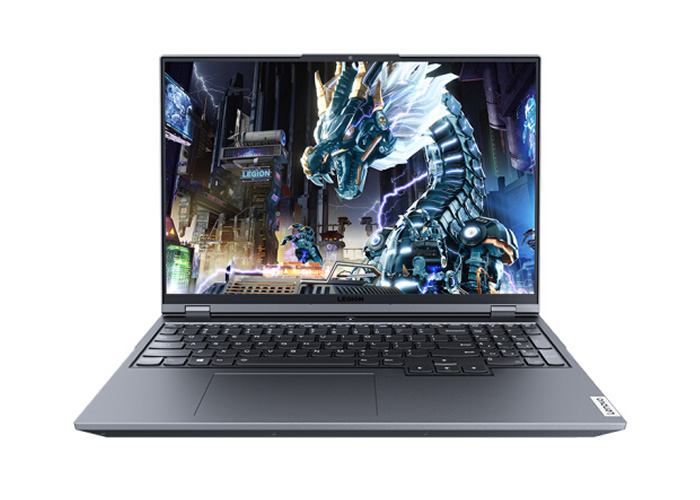
The color output of this device is truly impressive. When gaming, the color output is friendly and can reduce eye fatigue. Due to the change in screen ratio, the display area has increased by about 11%. The company has also significantly reduced the bottom bezel, which also raises the screen-to-body ratio to 91.7%. In addition, this display supports HDR400, G-SYNC, and FreeSync.
The measured sRGB color gamut coverage is 98%, while the sRGB color gamut volume is 104.2%, indicating good performance. In addition, Lenovo has added XRite color calibration to the Legion 5 Pro, offering a switch between Rec.709 and sRGB color schemes. After enabling sRGB mode, the maximum DeltaE is only 0.77, with very high color accuracy.
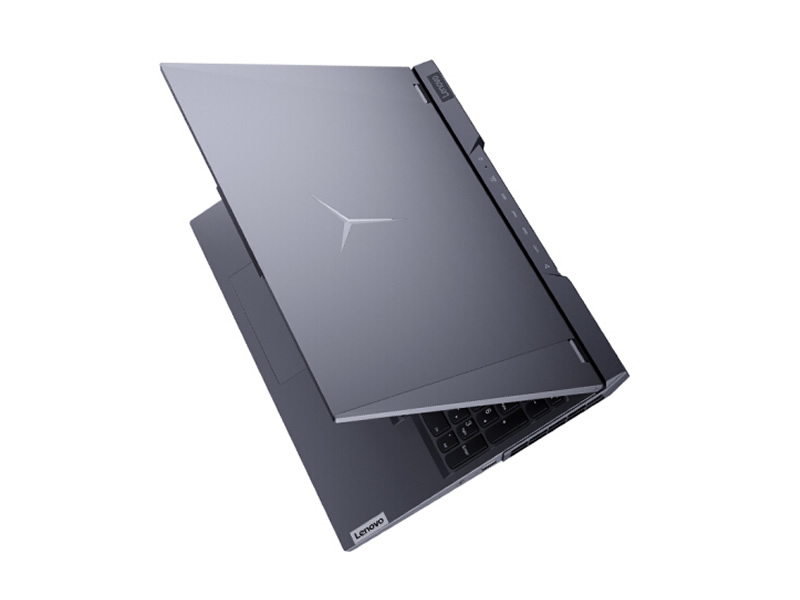
The back cover of the LCD screen and the bottom case are both made of metal. On the back cover of the LCD screen, there is a huge ‘Y’ logo that lights up when the device is in use. This is more like the Apple logo on Apple laptops. To turn the white light on or off on the ‘Y’ logo, you can use the Fn+L shortcut key.
Keyboard
For me, one of the most interesting parts of this gaming laptop is the keyboard. The design of the keyboard and keycaps maintains the high standards that the Lenovo Legion series has always upheld. In terms of feel, it is currently one of the most comfortable gaming keyboards.
The keyboard backlight is white and supports two brightness levels. The key travel is 1.5 mm, and the keycaps are slightly curved to match the curvature of the fingers. To enhance the user experience, Lenovo ensures that the key feedback is moderate. The round keycaps and the relatively large touchpad make this keyboard more attractive.

This gaming laptop comes with the ‘Legion TrueStrike Keyboard.’ The keys have a long travel distance and use cushioned trigger switches, ensuring that no matter how hard you strike the keys, the response remains consistent. This significantly improves accuracy and actuation speed. The keystroke feel is also very satisfying.
Ports
The Lenovo Legion 5 Pro has 10 ports, six of which are at the rear of the chassis. The ports on the rear (from left to right) include an RJ45 network port, a USB Type-C port (supports 100W PD charging, USB 3.2 Gen 2, DisplayPort 1.4, power delivery), two USB-A 3.2 Gen 1 ports, an HDMI 2.1 port, a USB 3.2 Gen 1 port (always on), and a DC jack.
In addition to a USB Type-A (USB 3.2 Gen 1) port on the right side of the fuselage, there is also a very special design E-Shutter button switch for the camera. This switch can be disabled when the camera is turned off to protect user privacy.
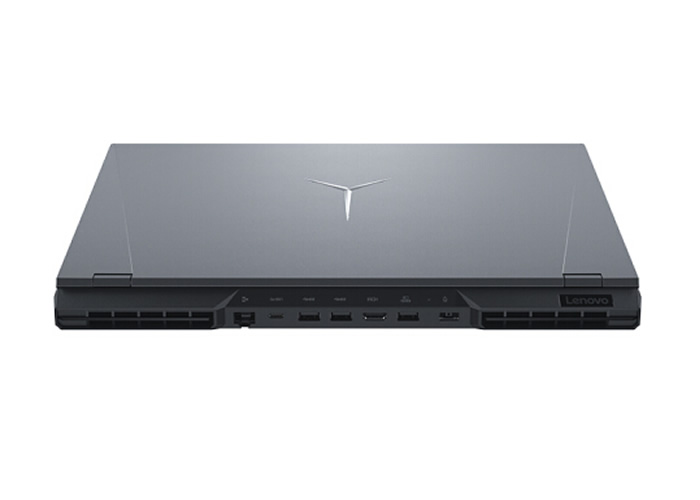
On the left side of the device, there is a USB Type-C (USB 3.2 Gen 2, DisplayPort 1.4) port and a 3.5mm audio jack, which can also be used as a microphone port. It is worth noting that all USB-A ports are USB 3.2 Gen 1 (5Gbps), while both USB Type-C ports are USB 3.2 Gen 2 (10Gbps).
On both sides of the six ports on the rear are two huge vents for proper heat dissipation of the laptop. We also have vents on both sides of this laptop and on the bottom. You can rest assured that heat dissipation will not be a problem.
Lenovo has also equipped this laptop with a feature called “Legion Coldfront 3.0.” This feature significantly improves the laptop’s cooling performance. Once activated, users can play games for several hours at full performance without experiencing throttling. The feature activates an intelligent air-intake system to optimize cooling for the vents under the keyboard. The laptop also features a dual-fan turbo design and a four-channel exhaust system to ensure excellent cooling performance.
For high-demand esports games, the heat sink will be optimized through the new intelligent AI mode to ensure no frame drops or stuttering at QHD resolution. Interestingly, players can manually control fan speed and voltage through Q Control 4.0. This is necessary to extend battery life and achieve a smooth experience when running at full speed.
Hardware
As a gaming laptop, one of the key aspects of this device will be cooling. The internal design of the Legion 5 Pro is as satisfying as ever. The cooling module is thoughtfully and thoroughly designed. In addition to large-diameter heat pipes covering the CPU and GPU cores, there are separate heat pipes for the video memory. A large metal heat spreader is wrapped around the heat pipes, which also reduces the temperature of the heat pipes.
The metal shield not only covers the memory and SSD as usual, but also does not spare the wireless network card. On one hand, it provides better electromagnetic shielding performance; on the other hand, it further enhances the internal neatness. The shielding cover also serves as an SSD heatsink, with thermal silicone pads placed in the corresponding positions.
This laptop uses dual-channel memory, consisting of two 8GB Samsung DDR4 3200 modules. The performance measured in the AIDA64 cache and memory benchmark is as follows. The measured read, write, and copy bandwidths are 47188 MB/s, 44767 MB/s, and 42285 MB/s, respectively, and the latency is 83.8 ns.
The wireless network card is an Intel AX200, supporting Wi-Fi 6 and 2×2 MU-MIMO.
The main SSD is a Western Digital SN730 with a capacity of 512GB, using the PCIe 3.0×4 protocol and 3D TLC chips.
An additional M.2 2280 slot is reserved on the other side for SSD expansion, and a 2242-sized slot is also reserved.
Thanks to the large 16-inch body, there is enough space for an 80Wh battery. Please note that it is best not to use the battery for gaming, as high-power discharge can cause significant loss in a short time.
CPU and GPU Performance
The following test was conducted using Fn+Q to switch to ‘Beast Mode,’ which has the highest performance and cooling capability.
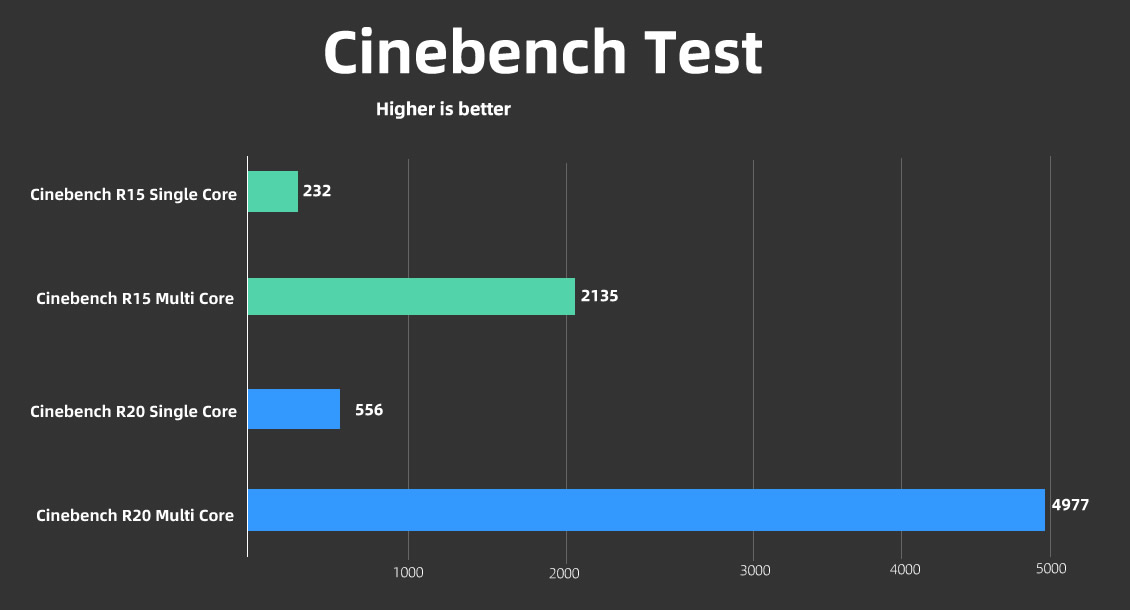
The Legion 5 Pro uses an AMD Ryzen 7 5800H processor, built on the Zen3 architecture, with a maximum boost frequency of up to 4.4GHz and a significant IPC increase compared to its predecessor.
Using AIDA64’s built-in stability test tool, select the FPU mode with the highest load on the CPU. The CPU power remains stable at about 76W, and the processor frequency remains stable at 3.8-3.9GHz.
The Ryzen 7 5800H processor has slightly improved multi-threaded performance compared to its predecessor. However, the single-threaded performance, which has a greater impact on gaming performance, has seen a significant improvement.
This laptop uses the RTX 3060 mobile graphics card, which uses the Ampere architecture with 3840 CUDA cores.
Lenovo has a built-in GPU core and video memory overclocking function in the BIOS. After turning it on, the boost frequency can reach up to 1525MHz, and the video memory equivalent frequency is 14.4GHz. Lenovo also provides a direct connection to the graphics card to avoid the performance loss caused by the integrated graphics output.
In the Furmark test, the graphics card can reach 130W at 1492MHz. This is basically the upper limit of the mobile version of the RTX 3060.
In the 3DMark Fire Strike DX11 test, the graphics score increased by 30%, and in DX11 TimeSpy mode, it increased by 41%. It is worth noting that the RTX 3060 can also increase the remaining 86W power of a non-directly connected RTX 3060 by 30%. This shows that this generation of graphics cards is more sensitive to power, and whether the graphics card is directly connected also has an impact.
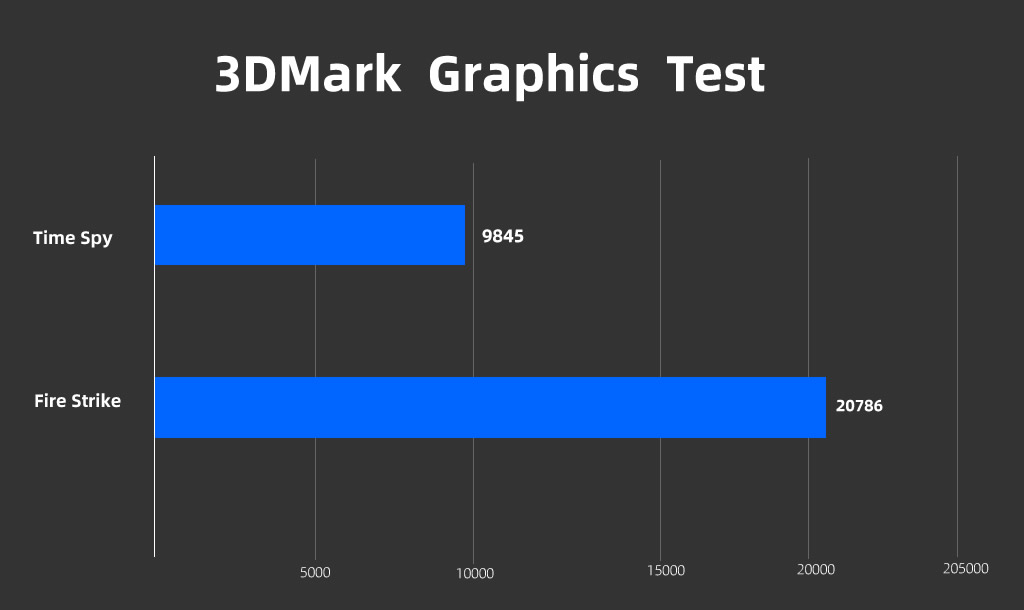
In the heat dissipation/temperature test, the CPU power consumption stabilized at about 50W, and the GPU power consumption fluctuated between 115 and 125W.
Overall, this level of performance is very strong, continuing the consistent style of the Legion, and there are currently no competitors in the market.
Taking the heat dissipation/temperature test for half an hour, using thermal imaging to capture the keyboard area. The highest temperature is only 42.5°C, which feels warm to the touch, and the area where it occurs is very small. Most of the keyboard area is only 30°C, at which temperature you may not feel any noticeable warmth. The Lenovo Legion 5 Pro’s surface temperature control is excellent.
Game Test
In the gaming test, we directly check whether some of the largest games can run smoothly. We will set the display directly to the screen’s physical resolution of 2560 x 1600, showing each pixel individually, to achieve the best viewing experience.
Far Cry: New Dawn: At extremely high graphics settings, the average frame rate can reach 80 FPS, with a minimum of 65 FPS, running smoothly.
“Forza Motorsport: Horizon 4” records the highest quality. The average frame rate is as high as 124FPS, and the game runs smoothly.
“Tomb Raider: Shadow” has the best image quality on the Legion 5 Pro. The average frame rate can reach 64 FPS, which is smooth.
“Assassin’s Creed: Hall of Valor”, which is a high-demand game, can get an average frame rate of 63FPS when running in very high quality, and it can basically run smoothly.
PlayerUnknown’s Battlegrounds offers good image quality, a 100% rendering ratio, and an average frame rate of about 108 FPS.
| Game | 2560 x 1600 |
| Far Cry: New Dawn | 80 fps avg, 65 fps low |
| Forza Motorsport: Horizon 4 | 124 fps avg |
| Tomb Raider: Shadow | 64 fps avg |
| Assassin’s Creed: Hall of Valor | 63 fps avg |
| PlayerUnknown’s Battlegrounds | 108 fps avg |
At lower pressure, Overwatch can reach a high frame rate of 150 FPS at maximum graphics and 100% rendering. Like PUBG, with support for G-SYNC and a 165Hz high refresh rate, you can get an excellent gaming experience.
Summary
After a round of testing, you will find that the Lenovo Legion 5 Pro is almost a balanced and sturdy hexagonal ‘warrior.’ Whether we are talking about the screen, performance, or cooling, it is hard to find any substantial shortcomings. From all aspects, this is a benchmark model for gaming laptops. Coupled with a launch price of less than $1,700, Lenovo has priced this laptop extremely low for many gamers.
Of course, like all other ‘perfect’ things, there are also imperfections. If there is any shortcoming with the Lenovo Legion 5 Pro, it would be its speakers and microphone. The combination is underwhelming, and we have much better in the market. If you are a bass lover, you’d better get your headset ready because the internal speakers do not deliver any bass. In addition, the microphone also fails to meet expectations. When on a call with the microphone on, the other end will barely hear what you are saying because you will sound distant.
In addition, Lenovo could have done better with the camera. A 720p camera cannot be considered excellent and lags far behind many other laptops in 2021. However, installing such a camera in such a thin top bezel is commendable.






 for review. We will test the screen, CPU, GPU, gaming performance, cooling performance, battery life, and so on.)
Lenovo Legion 5pro is good for interior designer and Architect programs?