
In the laptop market, thin and light laptops are always very popular. However, high performance is also a sought-after feature in the market. There is a popular saying that ‘you can’t have both the fish and the bear’s paw,’ which is exactly the situation when trying to make a thin and light laptop also high-performing. In recent years, thin and light laptops have been known for weak performance, poor screen quality, and limited port expansion. As a result, many users have the impression that the performance and usability of thin and light laptops are just barely enough.
However, with advances in graphics cards and processor technology, thin and light laptops have become better. The positioning of these laptops has therefore been redefined. Today, there are high-performance thin and light laptops on the market. These laptops are now top-notch in terms of hardware, productivity, and appearance.
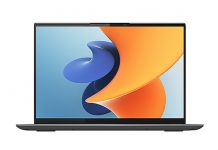
ASUS recently released the ASUS Vivobook Pro 14 OLED with a slim body and a stylish appearance. It also offers powerful performance and an excellent display, with the OLED screen being particularly impressive.
The ASUS Vivobook Pro 14 OLED is a Windows 10 laptop with a 14.00-inch display that has a resolution of 2,880 x 1,800 pixels. It is powered by a Core i5 processor and comes with 8GB of memory. The laptop has 256GB of SSD storage.
Connection options include Wi-Fi 802.11 and Bluetooth, and it comes with four USB ports (two USB 2.0), a USB 3.2 Gen 1 (Type A), a Thunderbolt 4 (Type C), an HDMI port, and a multi-card slot.
Asus Vivobook Pro 14 OLED Specifications
| Screen | 14-inch, WQXGA (2,880 x 1,800), 16:10, anti-glare, DCI-P3:100%, 90Hz, 0.2ms |
| Processor | Intel Core 11th Gen Core i5-11300H |
| Wireless Connection | Wireless 6 (Intel AX200), Bluetooth 5.0 (Dual band) 2×2 |
| Graphics card | Intel Iris Xe Graphics |
| Memory | 16 GB DDR4 3200 MHz |
| Storage | 512 GB SSD (single PCIe 3.0 M.2 SSD slot) |
| Camera | 720p HD camera with privacy shutter |
| Ports | 1x USB-A 3.2 gen1, 2x USB-A 2.0, 1x USB-C 3.2 gen1 (Thunderbolt 4), HDMI 1.4, microSD card reader, 3.5 mm jack |
| Battery | 63 Wh, 120W charger |
| OS | Windows 10 Home |
| Weight | 1.40 kg |
The first model of the Vivobook Pro 14 is powered by an AMD Ryzen 7 5800H processor. However, in response to market demand, ASUS released an Intel Core version of the Vivobook Pro 14. This laptop not only uses 11th-generation Intel Core H35 chips but also balances high performance with low power consumption. The laptop retains the design of the Ryzen version, but adds a Thunderbolt port.
The Intel Core Vivobook Pro 14 features a 2.8K resolution Samsung E4 OLED panel. This screen also supports a 90Hz refresh rate, 10-bit color depth, 100% P3 wide color gamut, 1,000,000:1 contrast ratio, and a peak brightness of up to 600 nits.
The Intel Core i5-11300H features 4 cores and 8 threads, an 8MB L3 cache, and a TDP of only 35W. ASUS also provides it with up to 45W of performance release and uses dual fans. In addition, ASUS equips the cooling system with dual heat pipes to keep the device’s temperature under control.
Considering that this device has more units in Europe, the Iris Xe graphics card also integrates the Intel Quick Sync technology. This technology makes video encoding and editing more efficient.
Design & Appearance
This laptop features an all-metal design. It looks sturdy and does not bend or warp. As a mid-range laptop, its design is not entirely high-end, but it is very aesthetically pleasing. The device has rough plastic bezels around the screen, which is not entirely a bad thing.
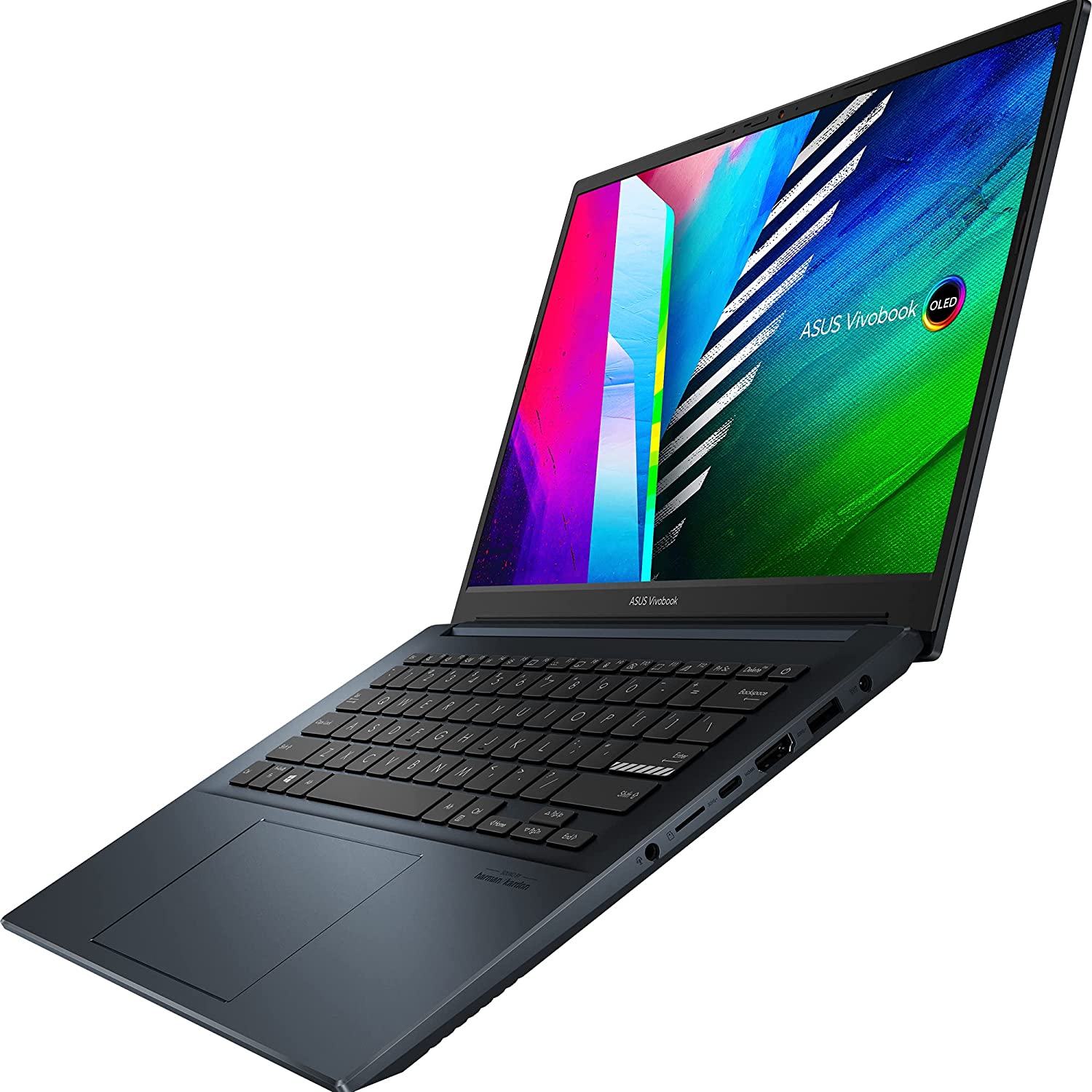
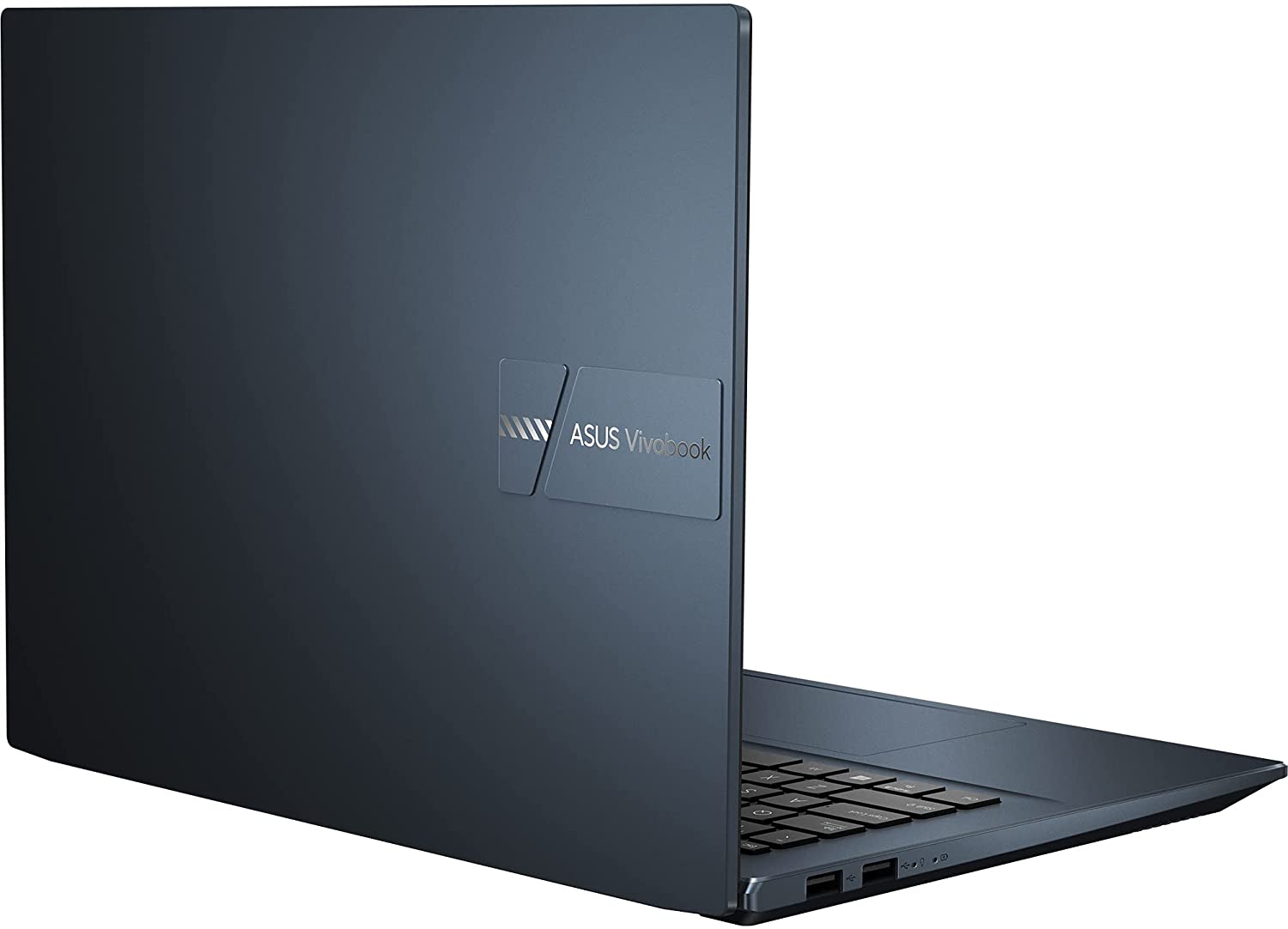
The dimensions of this laptop are 315.8 x 226.3 x 17.9 mm, and it weighs about 1.4 kg. A thickness of 17.9 mm and a weight of 1.4 kg indicate that this laptop is definitely slim and light.
On the back cover of the screen, the laptop has a stylish yet rough metal finish, with a CNC-engraved logo that is very easy to recognize.
Although there are several color options, the model we reviewed uses Tranquil Blue. This color is not very popular and may appear gray at first glance. However, from a certain angle, we can clearly see the blue appearance.
Display
This device comes with a 14-inch Samsung E4 OLED screen, providing a very immersive display experience. In addition to a 2.8K resolution, 90Hz refresh rate, and 600 nits peak brightness, this device covers 100% DCI-P3, 133% sRGB color gamut, and DisplayHDR 600 True Black. Furthermore, this display has been certified by Germany’s TÜV for low blue light and has SGS eye-protection certification.
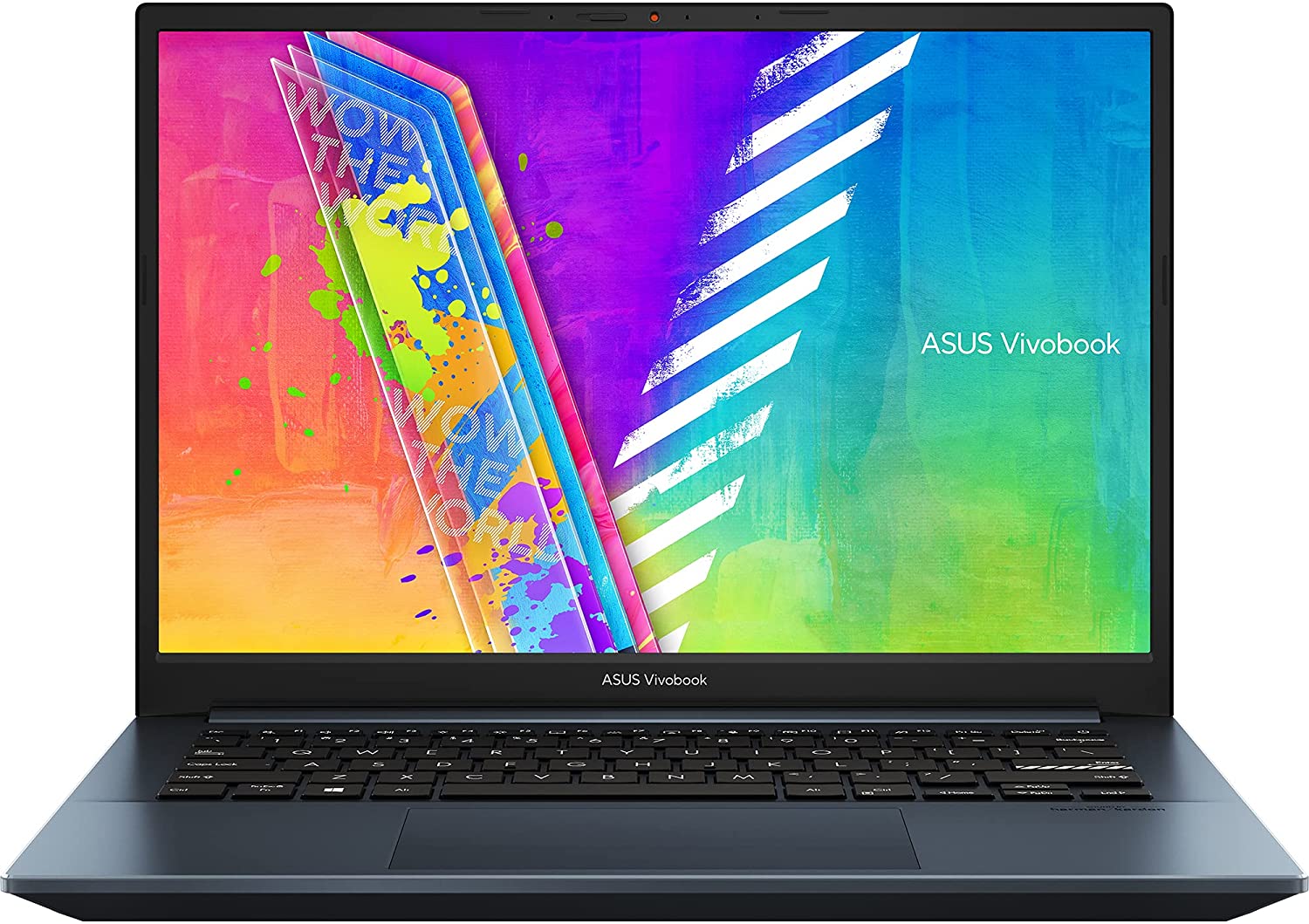
The screen bezels are very narrow on all sides, but the top bezel includes a physical camera switch. Users who need privacy can simply slide the switch to cover the camera.
We conducted some tests on the monitor. Let’s take a look at the actual performance of this screen.
The Asus Vivobook Pro 14 screen supports 100% sRGB, 96% Adobe RGB, 100% P3, and 94% NTSC color gamuts, which is extremely high. However, tests show that the maximum brightness of this screen is 342 nits, and at 100% brightness, the static contrast ratio can reach 26870:1.
As an OLED screen, like a mobile phone, it will be more prominent in games and movies than the data measured by the color calibration instrument after HDR is turned on.
The measured average Delta E value is 0.95, the maximum value is 2.26, and the minimum value is 0.31.
Just like the official promotion says, the overall performance of this OLED screen is excellent. It provides an outstanding gaming and video experience, while also reducing power consumption and extending battery life. For users sensitive to color, it can even be used as a professional display.
Keyboard
The keyboard of this laptop is slightly different from previous models. The Enter key may be the most noticeable key. This key is located on the far right side of the keyboard and features a special CNC-engraved design. The key travel is 1.4 mm, and the keycaps are concave curved for a more comfortable user experience. It also supports three levels of backlight adjustment.
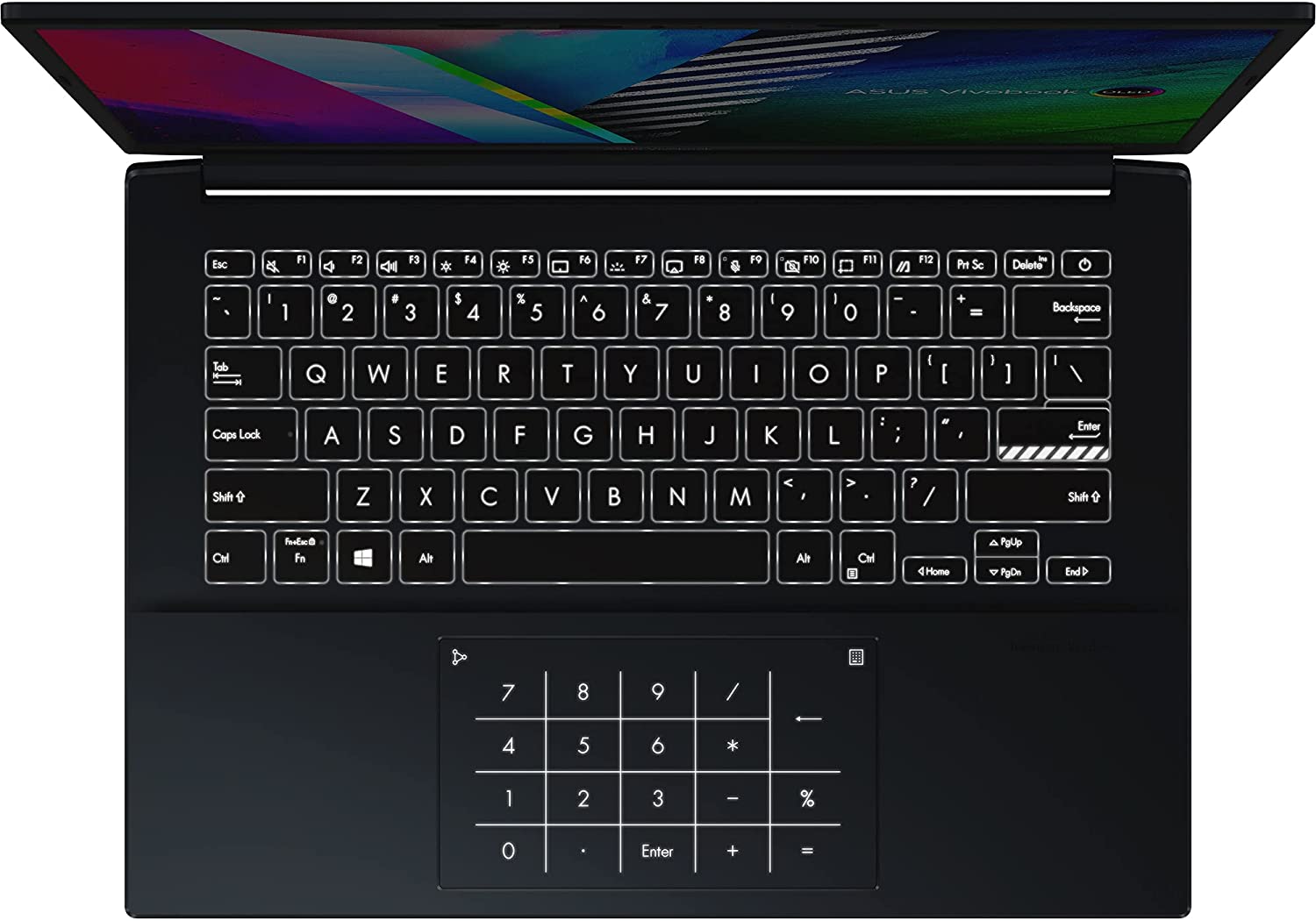
In addition, the power button integrates a fingerprint module and supports Windows Hello fingerprint recognition. Moreover, the power button no longer has an always-on light. Although the light was small, using the device without it is more comfortable. You can log in directly by pressing the power button without entering a password.
In addition, you can use the shortcut keys Fn+F9 and Fn+F10 to turn off the microphone and camera, respectively. On this keyboard, we can see that Page Up, Page Down, Home, and End are now built into the up, down, right, and left arrow keys, respectively. To activate any of these keys, the user needs to hold down the Shift key and then press the arrow key. For example, if you need to use the Page Up key, just hold down the Shift key and press the up arrow key. ASUS had to integrate these functions into the arrow keys because the extra function key row previously available on the VivoBook 14 model is no longer available.
This 5.9-inch touchpad features a special glass surface treatment, giving it a delicate and smooth feel. The touchpad is located in the center of the palm rest and is slightly softer than the clickpad on the ASUS ZenBook. In addition, this laptop also comes with a virtual dial called Asus DialPad. You can activate this virtual dial by swiping from the right corner on the touchpad. Usually, this virtual dial allows users to adjust screen brightness and volume. However, on the ProArt Creator, you can customize this feature to add more functions.
Connectivity
In the past, most thin laptops did not have enough connectivity ports. However, the Asus Vivobook Pro 14 comes with just enough ports for connectivity.
On the left side of this laptop, there are two USB Type-A ports. However, on the right side, it has about six ports. We have a 3.5mm headphone jack, a Micro SD card reader, a Thunderbolt 4/USB Type-C port that supports PD charging, an HDMI video output port, a USB 3.2 Gen1 Type-A port, and a round charging port.
The Vivobook Pro 14 comes with a round port charging cable and an AC charger. If you find it not portable enough, you can bring a USB Type-C charger.
For wireless connectivity, this laptop also has the latest-generation Wi-Fi 6 and Bluetooth 5.
Hardware performance
CPU
The ASUS Vivobook Pro 14 is powered by an Intel 11th Gen Core i5-11300H processor, which is manufactured using the 10nm SuperFin process and with a base frequency of 3.1 GHz. In addition, its turbo frequency can reach 4.4 GHz, it has 8 MB of L3 cache, and the Iris Xe graphics have a default TDP of 35W.
According to ASUS, this chip strikes a balance between performance and power consumption while maintaining low core voltage. The processor has four cores and eight threads, but its performance has been further optimized. Therefore, most high-performance slim laptops on the market currently use this chip. However, let us look at the actual practical performance of this processor.
CPU-Z
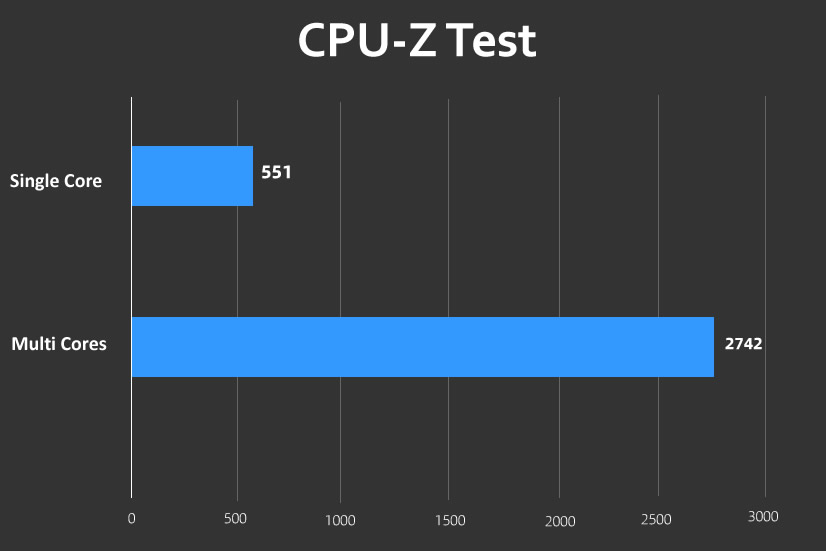
In the CPU-Z score test, the single-core score is 551, which is comparable to the Core i9-10980XE, while the multi-core score is 2742.
CineBench
In the CineBench R15 test, the i5-11300H scored 210 in the single-core test and 985 in the multi-core test.
In the CineBench R20 test, the single-core score is 525, and the multi-core score is 1645.
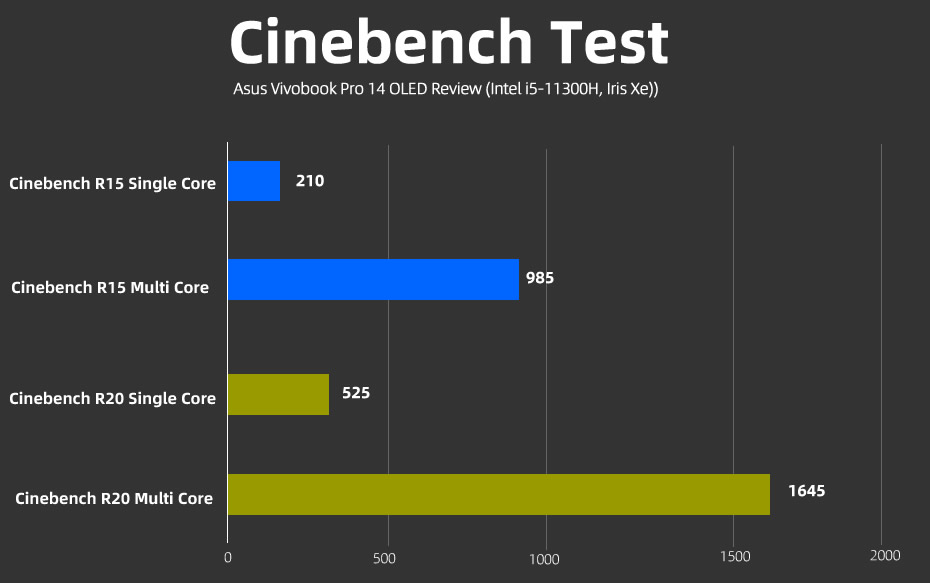
For reference, this processor’s CineBench score is close to the Core i7-10700K on the single-core test and to the i5-8400 on the multi-core test.
wPrime
In the wPrime test, the 32M single-thread run took 31 seconds, while the 1024M multi-thread run took 191 seconds. For reference, the i5-10210U multi-core 1024M reached 321 seconds, an increase of up to 40%.
GPU performance
The Intel Core i5-11300H processor in the ASUS Vivobook Pro 14 includes an integrated Iris Xe graphics card. This GPU features 80 execution units, approximately 640 stream processor cores, a boost frequency of 1.3 GHz, and an integrated Intel Quick Sync module. Now let’s take a look at the actual performance of this chip.
3Dmark
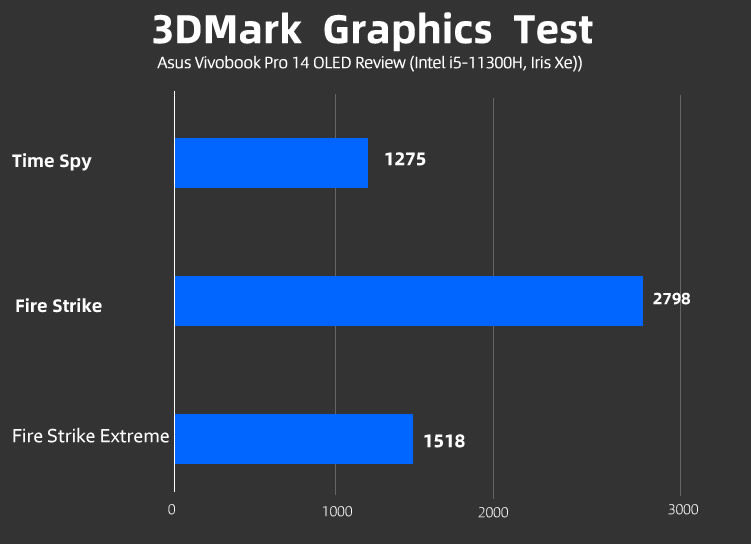
In the 3DMark Time Spy (2K rendering resolution) test, it scored 1275 points with an operating frequency of 1300 MHz. In addition, the highest temperature during the entire test was 81 degrees.
In the 3DMark Fire Strike (1080P rendering resolution) test, it scored 2798 points with an operating frequency of 1300 MHz. In addition, the maximum temperature was 75 degrees. In the 3DMark Fire Strike Extreme (2K rendering resolution) test, it scored 1518 points, with an operating frequency of 1300 MHz, and the maximum temperature was 76 degrees.
RAM
The ASUS Vivobook Pro14 has built-in dual-channel DDR4 3200MHz 16GB onboard memory, with timings of 22-22-22-48 CR1. Using AIDA64 for memory cache testing, the measured read, write, and copy bandwidths are 42875 MB/s, 40404 MB/s, and 37010 MB/s, respectively. In addition, the latency is 86.7 ns.
SSD
The Vivobook 14 Pro uses a 512GB Intel Optane NVMe SSD and offers 32GB of Optane memory acceleration to further enhance SSD performance. In CrystalDiskMark, the sequential read speed is 2850 MB/s, the write speed is 1308 MB/s, and the 4K random read and write speeds are 153 MB/s and 124 MB/s, respectively.
On the AS SSD benchmark, the SSD sequential read speed is 1191 MB/s, the write speed is 622 MB/s, and the 4K random read and write speeds are 62 MB/s and 125 MB/s, respectively.
The two software evaluation standards (CrystalDiskMark and AS SSD) are different, so the running scores are significantly different. However, the scores belong to the same mainstream level.
Heat Dissipation
Given the high-performance Intel chip, ASUS has adopted a dual-fan design on this laptop. This design achieves large-area directional cooling, so there are two rows of ventilation grids at the bottom of this laptop.
However, when you look at the picture of the bottom of this device, it appears that there are three rows (vents) for heat dissipation. However, the first row is only decorative; if you look closely, you will find that you cannot see inside the device from the first row. Therefore, the actual heat dissipation vents are only the second and third rows.
To test cooling and temperature, we used AIDA64. In the first 20 minutes, the Intel Core i5-11300H’s power consumption stayed at 42W, with a frequency of 3.6GHz. This basically aligns with the official specifications (of course, it also depends on the application environment), but ultimately, this laptop will stabilize at 38W.
During the testing process, the frequency was 3.4 GHz, and the temperature remained around 94 degrees from the start to the end of the test. Interestingly, the temperature fluctuated little throughout the entire test.
In terms of observed temperature, the entire keyboard area (where the CPU and other major components are located) is slightly warm, but it is acceptable. The touchpad and palm rest area are relatively cool and are not affected by the heating above.
Battery Life
The ASUS Vivobook Pro 14 comes with a 63Wh lithium battery. We tested the battery life of this laptop using PCMark 10.
The scene selected for the test is a modern office using PCMark 10; the power mode is set to “longer battery life,” and all other processes are disabled during the test. The network connection is turned off, and the screen brightness is adjusted to 50%.
In the PCMark 10 Modern Office scenario battery life test, the score was 8 hours and 16 minutes. This means that this laptop can provide users with a full day of usage. Of course, they need to set the laptop to offline office mode.
Summary
The Intel Core i5-11300H processor has 4 cores and 8 threads, with a default power consumption of 35W, but its actual stable power consumption is close to 45W. Its performance can be comparable to some more powerful entry-level gaming laptops. Thanks to its powerful cooling system, this chip can run at full speed without significantly raising the temperature.
Its OLED screen has received professional certifications, including DisplayHDR TrueBlack 600 and Pantone color. Its color display and color gamut coverage are more accurate and wider. Users who enjoy watching movies, designing, and video editing will have an immersive experience. The OLED display saves power, which is a very advantageous aspect of this laptop, as it extends battery life.
Although this device is slim and lightweight, it still comes with a rich array of ports, including Thunderbolt 4 with speeds of up to 40Gbps. This laptop supports PD charging and can also connect to high-performance GPU docks, high-speed SSDs, docking stations, 8K displays, and more to meet various expansion needs.
Asus also pays more attention to privacy. The laptop camera includes a physical switch that allows one-click blocking to prevent malicious spying, and it also has a special shortcut key that disables the camera and microphone with one click.
In addition, it is very necessary to mention the MyASUS software that comes with the ASUS Vivobook Pro 14. This software not only has an attractive interface but also offers intelligent features such as color adjustment, AI noise reduction, Wi-Fi management, and battery protection.
The price of this ASUS VivoBook Pro 14 Intel Core Edition is under $950. It comes in two color options: Quiet Blue and Star Silver.





Thank you for such an elaborate and well written review on this laptop. There are hardly any reviews out there on this machine, glad to come across this one.
By the looks of it, it’s a very capable laptop.