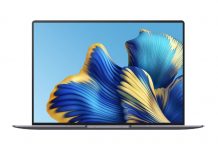
Lenovo is a well-known brand in the laptop market, and the company has several laptop series for different purposes. The Lenovo Yoga Slim laptops focus on design and cutting-edge performance. The combination of style, portability, thinness, and exquisite craftsmanship brings an immersive entertainment experience to Yoga Slim users.
Not long ago, the company upgraded the Yoga Slim 7 Pro with better chips that deliver a better user experience. This laptop not only comes with a larger 16:10 IPS display that supports 2.5K resolution and up to a 120Hz refresh rate, but also features a better AMD Ryzen 5000 Zen 3 Cezanne APU and an optional Nvidia GeForce RTX 3050 graphics card. Specifically, the Yoga Slim 7 Pro 16 comes with the Ryzen 7 5800H processor, which can run at an 80W TDP.
Many laptop manufacturers are more interested in marketing gimmicks and competing to be the first to use new technologies or chips. However, Lenovo has no interest in this. The Yoga Slim series has been very stable over the past two years. With the launch of the Lenovo Yoga Slim 7 Pro 16, it seems the company will continue to maintain its tradition.
Fortunately, potential buyers of the Lenovo Yoga Slim 7 Pro 16 only need to spend about $1,200 to own this device. This is one of the selling points of this high-end laptop. However, the lack of I/O ports and Thunderbolt ports may be a drawback of this device.
The overall performance of the Yoga Slim 7 Pro 16 is excellent. Once you get used to working on a large screen, the small screen can feel a bit cramped. Using this laptop is like watching a movie on an IMAX screen. Interestingly, the high performance of this large screen is not only evident in gaming. Even when watching videos or browsing the web, you can feel the immersive experience this screen provides. In addition, the high refresh rate and high resolution make this device absolutely lovable. After experiencing the Yoga Slim 7 Pro 16, it is really difficult to go back to using other devices.
Specifications
| Screen | 16″ 2.5K (2560 x 1600) IPS, 16:10, 100% sRGB, 400 nits, 120 Hz, 92% AAR, TÜV LBL Eyesafe + Eye Comfort, SGS Vesa Certified DisplayHDR 400 |
| Processor | AMD Ryzen 7 5800H, 8-core, 16-thread, 3.2-4.4GHz |
| Wireless Connection | 2×2 WiFi 802.11 ax, Bluetooth 5.1 |
| Graphics card | DIS: NVIDIA GeForce RTX 3050 + UMA: AMD Radeon Graphics |
| Memory | DDR4: 16 GB Dual Channel |
| Storage | SSD PCIe M.2: 512 GB |
| Camera | IR Camera TOF Sensor |
| Ports |
|
| Battery | 75WHr |
| OS | Windows 11 |
| Weight / Thickness | 2.1 kg (4.6 lbs) / 17.4 – 19.9 mm ( 0.69”–0.78”) |
The Lenovo Legion 5 Pro uses an AMD Ryzen 7 5800H processor with 8 cores and 16 threads. It also uses the latest GeForce RTX 3050 graphics card.
Design & Appearance
Lenovo has done a great job with the design and appearance of the Yoga Slim 7 Pro 16, and it can even be said to be perfect. At first glance, this laptop looks like a high-end device. Fortunately, this impression does not change when you look closely. The anodized metal texture is really outstanding, and you can feel its comfort when touching it.


However, to achieve proper heat dissipation, the bottom plate of this laptop is made of plastic. The feel of this laptop is neither very smooth nor very rough. It has just the right grip, making it unlikely to slip from the hand, while still being smooth enough to hold comfortably without any discomfort. The device has the clean appearance typical of a traditional productivity laptop.
In addition to the high-end metal body, the lid (back of the display) also features a popular CNC-engraved YOGA LOGO in the top left corner, which is very eye-catching. In the bottom right corner, there is a less conspicuous ‘Lenovo’ engraving. The model we reviewed is the gray option; however, it also has a silver option.
Although we consider it an ultrabook, for some people it may not be entirely slim, as it weighs about 2.1kg. Of course, there are many lighter laptops on the market. However, considering the hardware it carries and the performance it provides, this laptop is definitely considered slim. The laptop’s dimensions are 356 x 246 x 17.4–19.9 mm (14” x 9.7” x 0.69”–0.78”). There are two large ventilation holes at the bottom of the laptop for cooling, which help keep the device’s temperature relatively low. In addition, there are two small plastic bumps on the back of the laptop that provide grip to prevent it from sliding off the desk. The dual speakers are also located on the bottom of the laptop, near the grip bumps.
As a high-end productivity laptop, the Lenovo Yoga Slim 7 Pro 16 comes with some special features. Let’s take a look at the special camera design on the top bezel of the screen. Upon closer inspection of the camera design, you can see that it adopts a ‘raised frame design,’ which means that in addition to the front camera, there is also an infrared camera. With this module, when you try to log into the system, the computer can perform facial recognition. When you take the computer out of your bag and open the screen, you can access the system directly via facial recognition without pressing the remote power button or the fingerprint recognition button.
In addition to the infrared camera, the notebook also has a built-in TOF sensor. Through it, you can also achieve functions such as automatic pause and resume of video playback, automatic screen lock, seat sensing, etc., which are not very obvious but very practical. Lenovo also has some interesting customization and personalization features, which you can find in the “toolbox” of the Lenovo Computer Manager app.
Display
Large screens usually represent productivity. Looking back at the development history of smartphones, we can see that the demand for large-screen devices has been steadily growing. This is because large screens can display more information, and only screens that are big enough can fully leverage the advantages brought by the explosion of information. Technically, a 16-inch display is essentially the same as a 15-inch screen, especially in terms of size. However, an ultra-narrow bezel design allows a laptop to carry a larger screen without changing the body size. The ultra-narrow bezel design of the Lenovo Yoga Slim 7 Pro 16 is truly impressive.
The Lenovo Yoga Slim 7 Pro 16 uses a 16-inch QHD IPS touchscreen for the first time. Lenovo uses a 2.5K 120Hz screen with a 16:10 ratio. The ultra-thin bezels on a huge 16″ screen give you some valuable extra workspace. This QHD IPS touchscreen delivers smooth visuals at a 120Hz refresh rate.
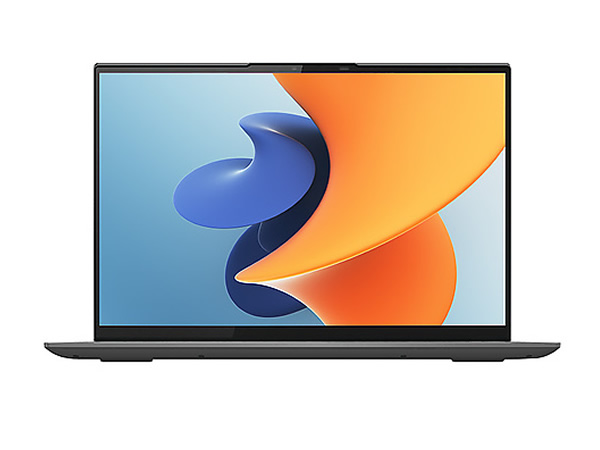
The colour output of this device is simply amazing. The friendly colour output of this display significantly reduces eye fatigue. Furthermore, the screen ratio increases the display size, allowing users to get more on a small screen. The Lenovo Yoga Slim 7 Pro 16 features a narrow bezel on all sides, and its screen-to-body ratio exceeds 90%.
The display of this laptop allows users to capture every subpixel, and its bezel is very narrow. The top and side bezels are only 3.9 mm thick, while the bottom bezel is slightly thicker. Few laptops in the industry have such thin bezels on all sides.
The screen is an important selling point of the Lenovo Yoga Slim 7 Pro 16. The large 16-inch screen offers a very wide viewing angle, high color gamut, high resolution, and high refresh rate. In addition, the integration of a touchscreen can address all your concerns about the screen. In actual measurements, the high color gamut can reach 100% sRGB and 77% Adobe RGB, delivering excellent color performance. In addition, its brightness can reach 422 nits (up to 500 nits at maximum), allowing a clear display even in brighter ambient light. The color accuracy can reach an average ΔE of 1.57, which is also outstanding.
A 120Hz high refresh rate is very interesting. In fact, high refresh rates on computers have long existed, but they are usually reflected on external monitors. Laptops have always been limited to a 60Hz display. Today, Lenovo can be regarded as one of the first laptop manufacturers to popularize high refresh rates on productivity laptops. If 120Hz is still not smooth enough (for those who might want to play games), you can even sacrifice a bit of display quality and switch to, for example, 144Hz, which takes only two clicks in the BIOS.
Keyboard
The keyboard of the Lenovo Yoga Slim 7 Pro 16 is one of the most attractive designs of this laptop. Of course, on a 16-inch laptop, you would expect to see full-size arrow keys and a familiar numeric keypad. These two features elevate the productivity of the Yoga Slim 7 Pro 16 to a new level.
The keyboard design, especially the key design, is not regular. This keyboard does not use the conventional rectangular/square design, nor does it have a flat key surface. The keys are designed with curved profiles, and their surfaces are parabolic. This provides perfect balance when pressing the keys. It allows users to type faster, more accurately, and more comfortably on a precisely crafted keyboard. The keys offer a faster, more resilient, and more responsive typing experience.
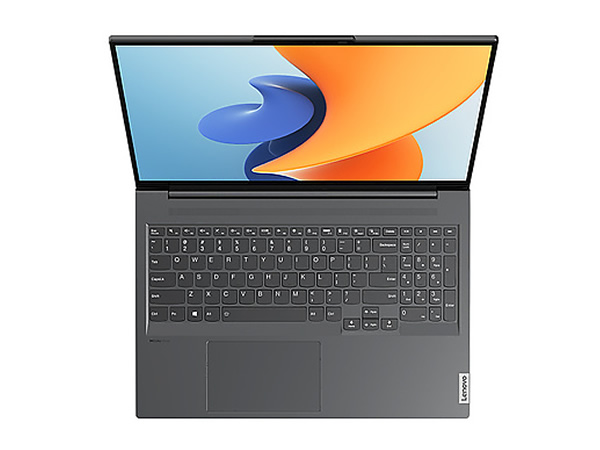
This 5.9-inch touchpad features a special glass surface treatment process, giving it a delicate and smooth feel. The touchpad supports multi-touch gestures, allowing users to access various features through multi-finger touches. It is worth noting that these gesture functions are largely unavailable on ordinary non-productivity laptops. In addition, this touchpad is very smooth and relatively large. If you are used to rougher touchpads, it may take some time to get used to it. The hidden left and right buttons are comfortable to press and provide simple feedback. It can perfectly replace a mouse in most business or meeting environments.
Ports
The Lenovo Yoga Slim 7 Pro 16 has seven ports, as well as a microphone and power button on the side. There are three ports on the right side and four on the left. On the right, we have a microphone, SD card slot, two USB-A (USB 3.2 Gen 1) ports, and a power button. On the left, we have an HDMI 2.1 port, a square DC input, a USB Type-C (PD + USB 2.0), and an audio jack.
In addition to a USB Type-A (USB 3.2 Gen 1) port on the right side of the body and a USB Type-C (PD + USB 2.0) port on the left side of the body, there is also a USB Type-C (full-feature) port. It is worth noting that all USB-A ports are 3.2 Gen 1 standard (5Gbps), while both USB Type-C ports are 10Gbps full-speed USB 3.2 Gen 2.
Hardware Performance
The Lenovo Yoga Slim 7 Pro 16 is a productivity laptop, so its performance testing is quite straightforward. Unlike gaming laptops, the requirements for productivity laptops are not that high. In short, we can safely say the Lenovo Yoga Slim 7 Pro 16’s performance is satisfactory. However, let’s take a look at the test data for the CPU, GPU, and battery.
CPU
The Lenovo Yoga Slim 7 Pro 16 comes with an AMD Ryzen 7 5800H processor. This is one of the most commonly used processors in productivity laptops today. Its excellent performance allows you to handle almost all tasks fearlessly. The CineBench R20 test results for the CPU are 4468 points for multi-core and 529 points for single-core. This performance is truly impressive, and the 5800H processor lives up to its reputation.
GPU
The graphics card on this laptop is the popular Nvidia GeForce RTX 3050. As an entry-level ray tracing graphics card, it has been very popular since its launch. It also significantly enhances the productivity of this 16-inch laptop. The GeForce RTX 3050 has a power consumption of 55W. According to the 3DMark Time Spy test, it scored 5040 points, and its performance can meet the smooth operation requirements of most large software designs and games.
Heat Dissipation
In the thermal/temperature tests, the CPU power consumption stabilized at about 45W, and the GPU power consumption fluctuated around 40-42W. Even under these high-temperature conditions, the Lenovo Yoga Slim 7 Pro 16 can still maintain at 85W.
Overall, the performance level is very strong, continuing the consistent style of the Yoga series. During a half-hour heat/temperature test, thermal imaging was used to capture the keyboard area, with a maximum temperature of only 40.5°C, and the high-temperature area was very small. Most of the keyboard area was only 30°C, at which temperature you might not feel a noticeable warmth. The Lenovo Yoga Slim 7 Pro 16’s surface temperature control is excellent.
This laptop is a high-productivity notebook, and a powerful cooling system is also essential. Therefore, it comes with Lenovo’s unique ‘Anemoi’ cooling system. This system features a dual D8 heat pipe and 79-fan blade design, allowing the system to handle 80W of laptop performance output. With the power adjustment design using Fn+Q, you can switch freely between energy-saving, smart, and beast modes.
Battery Life
According to Lenovo, in MobileMark (2018), this device has a battery that can last up to 12.5 hours. In addition, the company claims that local video playback can last up to 16.5 hours, while it takes up to 3 hours to fully charge using the rapid charge boost.
However, we tested the battery. In our test, we set the screen brightness to 70% and kept the Wi-Fi connection on. The battery took 7 hours and 19 minutes to drop from 100% to 20%. Since a full workday lasts about 8 hours, the Lenovo Yoga Slim 7 Pro 16 will definitely let you go out for a day without stress.
Conclusion
The Lenovo Yoga Slim 7 Pro 16 should be considered a very good productivity tool. Regardless of the size, the related productivity research is very comprehensive. After thoroughly testing the laptop, its refined and even elegant features are fully reflected in the design and other details. Of course, the large screen is one of the biggest advantages of this laptop.
The Yoga Slim 7 Pro 16 is almost perfectly balanced across screen, performance, and cooling, making it hard to find serious shortcomings. Of course, like other perfect things, it is not perfect either. If the Lenovo Yoga Slim 7 Pro 16 has any shortcomings, it is its connectivity. The device lacks many I/O ports and a Thunderbolt port, which could be a drawback. Weighing over 2kg could also be another disadvantage of this laptop. However, we do not expect a large 16-inch laptop to be lighter. Most laptops in this category can easily weigh up to 3kg.
In addition, the Lenovo Yoga Slim 7 Pro 16’s facial recognition technology and fingerprint sensor can prevent personal privacy leaks, providing users with secure personal privacy protection. The screen delivers an excellent visual experience. Moreover, the battery life is sufficient to handle high-load office work throughout the day, which is exactly what a business laptop should be like.