The ASUS TUF Gaming A15 FA506IV is the latest gaming laptop from ASUS, which features an AMD Ryzen 7 4800H processor and an NVIDIA GeForce RTX 2060 graphics card. It comes with 8GB of DDR4-3200 MHz memory and an Intel 660p 512GB M.2 SSD. Today, I will remove its back cover to explore its internal structure. With this article, you can upgrade the memory, M.2 SSD, and 2.5-inch hard drive for your notebook.
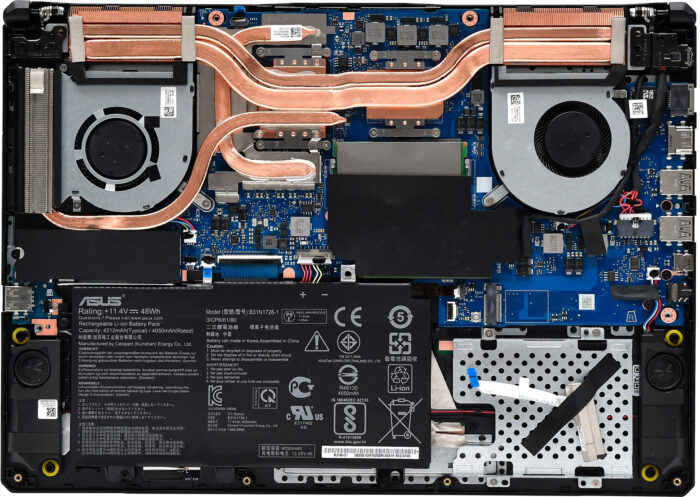
Image source: zol
To remove the back cover, you need to prepare a Phillips screwdriver and a thin plastic pry tool. Use the Phillips screwdriver to remove the ten screws that secure the back cover. Then use the thin plastic pry tool to slowly pry open the bottom cover. You can insert the pry tool at the LCD hinge and then slowly slide it to release all the clips holding the back cover in place.
When the bottom cover is removed, you can see two M.2 slots, two memory slots, a wireless network card, a cooling module, and a motherboard in the upper part. Its lower part includes the battery, a 2.5-inch hard drive bay, and speakers.
Its two memory slots are located next to the fan on the right, and one of the slots is installed with an 8GB DDR4-3200MHz memory module, so you can add an additional memory module. According to the ASUS official website, it can support up to 32GB of memory. This means it can install two 16GB memory modules.
Below the left fan, an Intel 660p 512GB M.2 SSD is installed. The other M.2 slot is located below the right fan. This M.2 slot supports PCIe 3.0×4 and NVMe protocols.
On the right side of the battery, ASUS has reserved a 2.5-inch hard drive slot. The laptop I received did not come with a 2.5-inch hard drive, but it already has a HDD caddy and SATA cable, so you only need to purchase a 2.5-inch hard drive.