The laptop market is quite complex, and there are different types for specific markets. Laptops are available for business, students, gaming, teenagers (young people), and even entertainment. The focus of these laptops usually differs because they target different outputs. Recently, HP launched a new gaming laptop for its younger users. The HP Victus 16 is a gaming laptop designed to be both understated and stylish. It comes with the latest mainstream hardware configurations, abundant expandability, and built-in efficiency applications, allowing gamers to achieve smooth gaming experiences.
The HP Victus 16 is not simply an iterative continuation, but a new product with the best genes in the HP gaming series. The Victus 16 comes with a new VICTUS Logo, highlighting a major upgrade to the Victus series.
HP Victus 16 Specifications
| Screen | 16.1″ 1920 x 1080, IPS, 144Hz, anti-glare, micro-edge WLED-backlit, DC dimming, 100% sRGB |
| Processor | Intel 11th gen Core i5-11400H (2.8GHz, 4 cores, 8 threads) |
| Wireless Connection | Intel Wi-Fi 6 AX201 (2×2), Bluetooth 5 |
| Graphics card | NVIDIA GeForce RTX 3050 Laptop GPU (4GB GDDR6) |
| Memory | 16 GB DDR4-3200 MHz RAM (2 x 8 GB) |
| Storage | 512 GB PCIe NVMe TLC M.2 SSD |
| Webcam | HP Wide Vision 720p HD camera with integrated dual array digital microphones |
| Ports |
|
| Battery | 4-cell, 70Wh Li-ion polymer |
| OS | Windows 10 Home |
| Weight | 2.46 kg |
The HP Victus 16 is available in 6 configurations. The different configurations only change the processor and GPU. However, this review considers the Intel Core i5-11400H processor and RTX 3050 graphics card.
Appearance
The HP Victus 16 uses a new mold, which is different from the previous series with the HP logo. The back cover of the screen features a new V-shaped logo. In addition, the hinges and other parts are also engraved with the Victus name. In fact, there are no traces of HP on this laptop, and if you were not informed, you might think that this device comes from a new brand.
Despite it has a 16.1-inch screen, the actual body is close to 15.6 inches. Of course, the only way to achieve this is by using an ultra-narrow bezel design, which increases the screen-to-body ratio. The overall appearance of this device is not large, and for a gaming device, it is portable.

The design has a smooth texture, and the logo makes the device look sturdy and sleek. This is why this laptop is considered a gaming laptop suitable for young players. The HP Victus 16 is available in black and white, but we reviewed the black version.
Display
As we mentioned before, this laptop has a 16.1-inch display, but it measures the same as a 15.6-inch laptop. It features an ultra-narrow bezel design, which is currently the mainstream design in laptops. This display design enhances the laptop’s performance in visual experience, browsing, and document display, providing an overall high-end visual feel. The laptop uses a three-sided ultra-narrow bezel design while retaining a camera on the top bezel, making game streaming, online meetings, or other social activities more convenient. The display supports up to 2K resolution and a 144Hz refresh rate. We tested the screen using SpyderXElite 5.6, which showed 100% sRGB, 72% NTSC, 78% Adobe RGB, and 79% P3, indicating better display performance. Its maximum Delta E is 3.16, its minimum Delta E is 0.06, and its average Delta E is 0.56.

In addition, the HP Victus 16 supports DC flicker-free dimming. This technology is a simple method to reduce screen brightness by lowering the current or voltage. This display has even obtained the German Rheinland TUV Blue Light Eye Protection certification. The color output is gentle, and long periods of screen viewing will not cause eye fatigue.
Keyboard and Ports
This laptop comes with a large keyboard with a numeric keypad. The overall feel of the keyboard is moderate (not too hard and not too soft). When typing, the sound of the keyboard is almost inaudible. The keyboard features LED backlighting, making it easier to type accurately in low-light conditions. The touchpad is 19% larger than the previous generation, making it more comfortable to use.
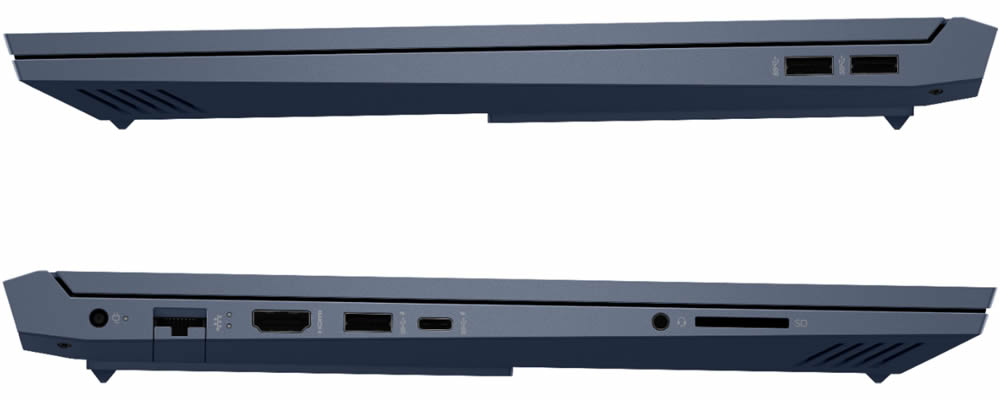
The HP Victus 16 has several ports on both the left and right sides. It has a USB port on both sides. However, there is only one full-featured USB Type-C port. In addition, there are three USB Type-A ports (one of which supports charging while powered off), one RJ45 port, one HDMI 2.1 port, an SD card slot, and a 3.5mm standard audio jack.
HP OMEN Gaming Hub
It is worth noting that the HP Victus 16 comes pre-installed with a dedicated game hub, the Omen Game Hub. It can differentiate and personalize your laptop, making it easy to set up with the OMEN Game Hub. According to HP, this hub is designed to meet the needs of every player.
One advantage of Omen Gaming Hub is the ‘Rewards Page.’ On this page, after a game ends, you can participate in any challenge of your choice to earn points, which can be used to redeem your favorite games.
If you are tired of static desktop wallpapers, you can download dynamic wallpapers online. These dynamic wallpapers can be used with Omen Gaming Hub and can adapt to the screen size, which is really cool.
In the Gaming Hub, there are also system core, voltage reduction, network acceleration, and performance control functions. The system core can show the current core hardware occupancy rate at a glance.
It is worth noting that the HP Victus 16 Omen Game Center has introduced a performance control mode, with three modes: Silent, Balanced, and Berserk. These are three different performance options that players can choose from. Players can select the performance scheme that suits their needs. When we turn on Berserk mode, the laptop’s CPU and GPU power consumption can increase by up to 20W. This mode is suitable for high-performance-demand games. In addition, in this mode, both temperature and fan noise will increase, but this ensures higher and more stable performance.
The HP Victus 16 is also HP’s first gaming laptop with a preset silent mode. For non-gaming users, this mode might be the best option, as the temperature does not rise and there is almost no noise. However, sometimes non-gaming users may need to run some high-load programs or import/export large files. In such cases, we set the laptop to ‘Balanced,’ and everything works fine.
Hardware Performance
Before any tests, we updated the system to the latest version, and the environment temperature was about 28 degrees Celsius. We also set the laptop to Berserk mode. The results here are for reference only.
Let’s take a look at the specific hardware specifications of the HP Victus 16. This laptop comes with an 11th-generation Intel Core i5-11400H processor (Tiger Lake H45 architecture, 10nm SuperFin process), 6 cores and 12 threads, 12MB L3 cache, a base frequency of 2.70 GHz, and a maximum single-core frequency of 4.50 GHz. The device also integrates Intel UHD Graphics (16 EU) and supports mainstream DDR4 3200MHz memory.
CPU
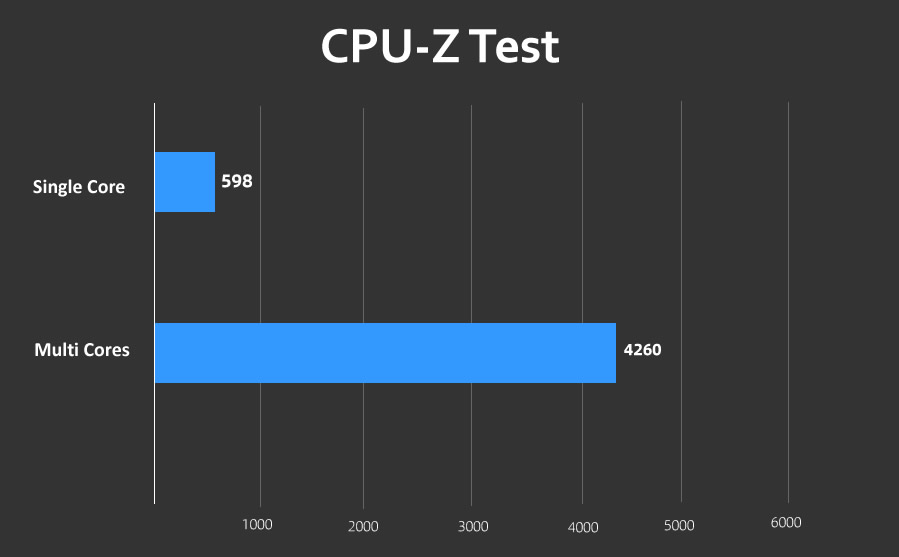
Using the CPU-Z benchmark, this laptop scored 598 in single-core and 4260 in multi-core.
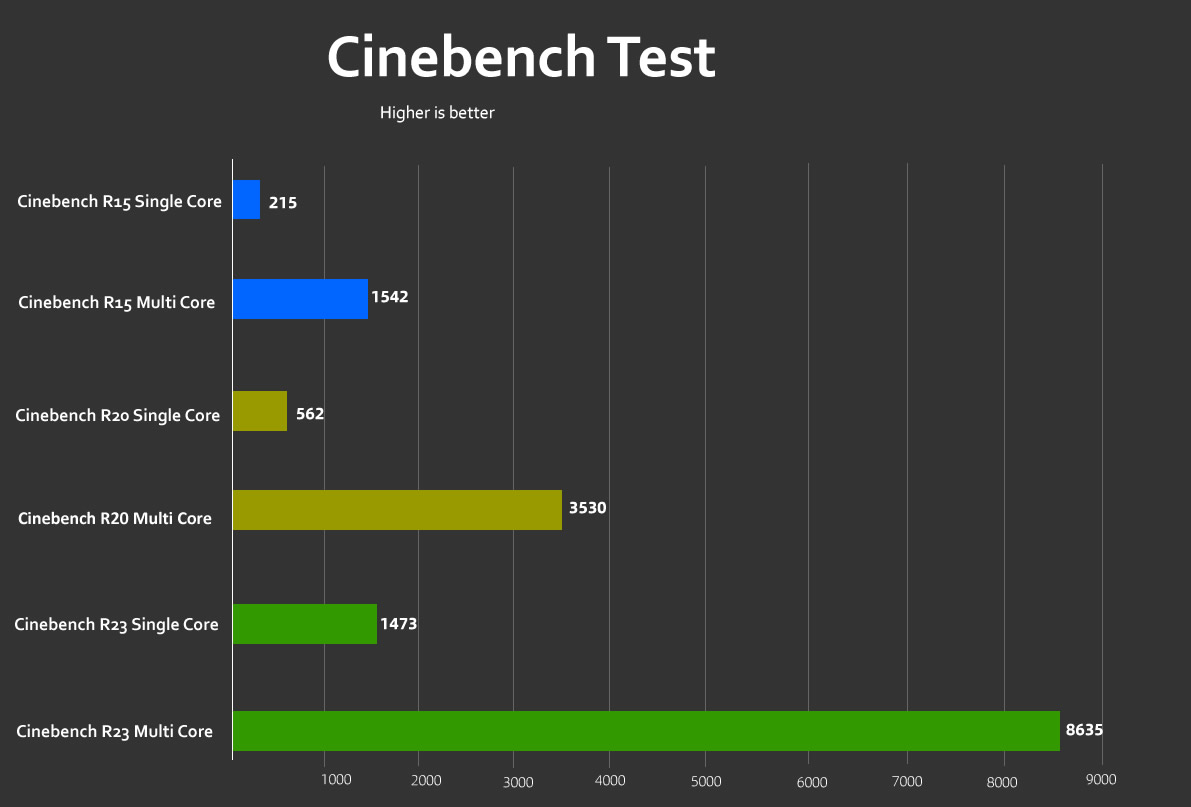
CINEBENCH R15 is a classic CPU performance benchmarking tool. In this test, the HP Victus 16 scored 215cb in single-core and 1542cb in multi-core.
On CINEBENCH R20, the Victus 16 has a single-core score of 562pts and a multi-core score of 3530pts.
The CINEBENCH R23 result is basically the same as the R20 test. The result of the former is about 2.5 times the latter. It recorded a single-core score of 1473pts and a multi-core score of 8635pts.
GPU
As an entry-level graphics card, the GeForce RTX 3050 is expected to become the standard configuration for thin high-performance gaming laptops. This chip uses the GA107 GPU core, is manufactured using Samsung’s 8nm process, and has 2,048 CUDA cores, including 64 Tensor cores and 16 RT cores. Its frequency range is 1057 to 1740MHz, and it comes with 128-bit GDDR6 memory (4GB capacity). It also supports PCIe 4.0, HDMI 2.1 output, ray tracing, DLSS super sampling, and NVIDIA Reflex low-latency mode. All these features ensure the graphics card meets the high demands of mainstream users running high-demand games and applications, while enhancing resolution and frame rates through proprietary algorithms.
In the 3DMark GPU tests, we conducted five tests, including Time Spy, Time Spy Extreme, Fire Strike, and Fire Strike Extreme. The scores for these tests were 5103, 2355, 11472, and 5850, respectively.

In ‘Tomb Raider: Shadow’ (DLSS cannot be enabled temporarily). However, the rendered frames totaled 11,220, with a final average frame rate of 72fps. In addition, in the game test of ‘Metro: Exodus,’ the average frame rate at 1080 resolution also reached 35fps.
SSD and memory
How fast is the HP Victus 16? The CPU and GPU performance are not the only factors that determine boot speed; the ability to copy and import/export large files, and other operations. This HP Victus 16 comes with PCIe 4.0 gaming-grade SSDs, which we have also tested. Compared to PCIe Gen3, both sequential read and write speeds have significantly improved.
Using CrystalDiskMark for testing, the sequential read speed reaches 6755.32 MB/s, and the write speed is 5126.36 MB/s, which is an appropriate flagship-level performance. If you simply feel that 512GB of capacity is not enough, this laptop also has an NVMe M.2 slot, and dual SSDs will be enough.
In terms of memory performance, AIDA64 recorded a read speed of 40119 MB/s, a write speed of 42965 MB/s, and a latency of 83.1 ns. Although the performance is not top-level, it is just sufficient.
Cooling System
A gaming device needs proper heat dissipation and cooling for excellent performance. In fact, heat dissipation is one of the most important features of gaming laptops.
HP has upgraded the cooling vents of the Victus 16. It has HP’s most advanced cooling technology. It also features four built-in heat pipes and quieter liquid bearings. Compared with the previous generation, the heat pipe length has increased by 18%, the heat pipe area increased by 12%, and the fan area increased by 7%, with the number of fan blades rising from 47 to 83. In addition, the noise level remains the same as the previous generation, but the total airflow of the Victus 16 has increased by 14%, with denser fan blades and a larger air intake, resulting in better cooling performance.
The ambient temperature is approximately 27 degrees. Using AIDA64 for testing, after running for 32 minutes, the CPU temperature is 91 degrees, and the power consumption is basically 45W.
When performing dual tests using AIDA64 and FurMark, after running continuously for 26 minutes, the GPU temperature was about 80 degrees, with a power consumption of 75.6W.
Conclusion
Most young gamers do not need a powerful gaming laptop. Although they want a laptop that can handle games, they also hope it is lightweight, portable, and capable of handling audiovisual entertainment, creative tasks, and other needs. The new HP Victus 16 is designed to meet a variety of user needs. Whether for gaming entertainment or online learning, this laptop can meet users’ demands with excellent performance.